On-Device AI on Android: What an NPU Actually Does
A spec sheet says 40 TOPS. Your OCR model still takes 400 ms and warms the back ...
 HappyLab shared on Oct 27, 2026HappyLabshared on Oct 30, 2026
There is a computer standing next to most fixed-mount reading stations. It is the weakest part of the station.
It has a fan that pulls in dust, an OS that updates itself at the worst possible moment, a remote-desktop session nobody can reach, and a disk that fails without warning. All so the line can do three things: take a picture, read a few characters, save a row.
That computer needs a cabinet, a power run, a monitor, a keyboard and a mouse — plus somebody on site who knows how to fix Windows.
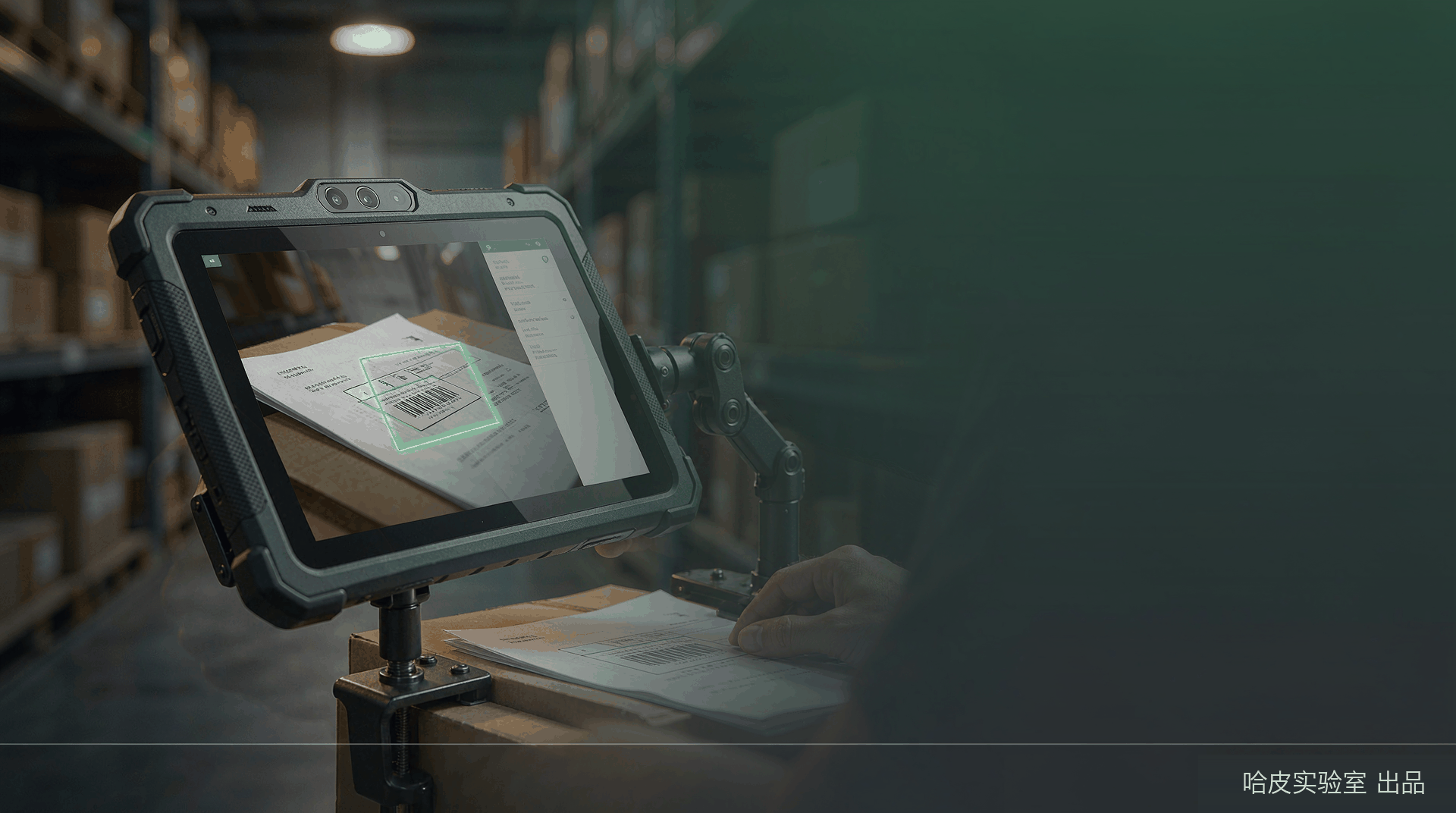
We put the whole thing inside a single Android tablet.
The short version
The reader sees. The tablet understands and remembers. One network cable, one power supply, and the station is in production — with no PC sitting beside it.
TIP
New global site. Our online tools are currently in Chinese while we finish the English build — it’s landing in the next few weeks. In the meantime, tell us what you need and we’ll set up a fast, tailored version for you: sales@happylab.me.
The real cost of a fixed-mount OCR station is rarely the recognition algorithm. It is the computer that hosts it.
| PC / industrial computer | Android tablet edition | |
|---|---|---|
| Form factor | Chassis + monitor + keyboard + mouse | One tablet on a mount |
| System | Windows + runtime + drivers | Android 16 — install one app |
| Boot | Log in, start service, wait for ready | Auto-start, foreground service always on |
| Maintenance | OS patches, antivirus, remote desktop, driver conflicts | In-app upgrade, config import/export |
| Power | Mains run, UPS decision, adapters | Type-C or dock, one cable |
| Interaction | Mouse on small buttons | Direct touch, two-finger zoom |
| Recovery | Reinstall OS, replace disk, call IT | Reinstall APK, import config |
| Footprint | A “computer corner” beside the station | Mounted with the reader, same run |
| Spares | Motherboard, RAM, disk, PSU each fail | One spare tablet of the same model |
This is not a PC app squeezed onto a tablet
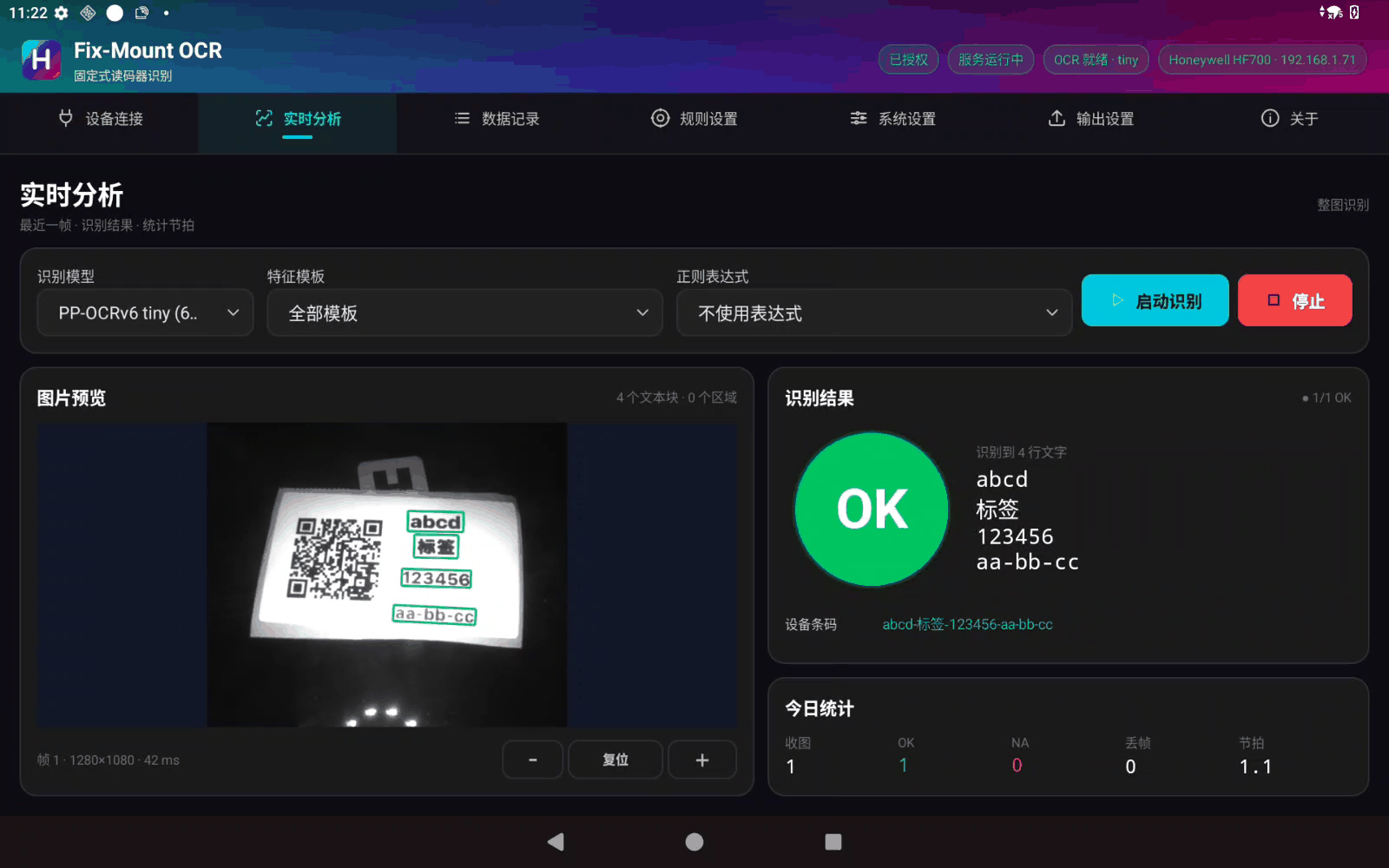
There is no remote desktop and no browser tab talking to a server. The FTP server, image decoding, ORB alignment, OCR inference, SQLite and the dashboard all run on the tablet. Cut the network, cut the server — recognition keeps working.
What the line sees: the station goes from a device, a computer, and a person who maintains the computer to a device and a screen.
1 | Photoelectric trigger |
Five steps, one pipeline:
The entire chain is local. No cloud, no second computer, and no dependency on the plant’s IT department.
A general-purpose FTP library is heavy, and the reader only ever uses two commands:
1 | USER / PASS → PASV → STOR → 226 |
It does not even send TYPE. It never calls LIST, SIZE, or walks a directory tree.
So the server is ours, and that is not about elegance. It is about controlling every byte of the sequence — so that when a station misbehaves on site, the problem can be located frame by frame instead of guessed at behind a black-box library.
A production line is not a file backup service. A backlog has no meaning.
Why there is no queue
If a line stops for ten seconds and restarts, you want the part in front of the reader now, not the 300 parts from ten seconds ago. Keeping only the newest frame is the back-pressure strategy that matches the physical situation.
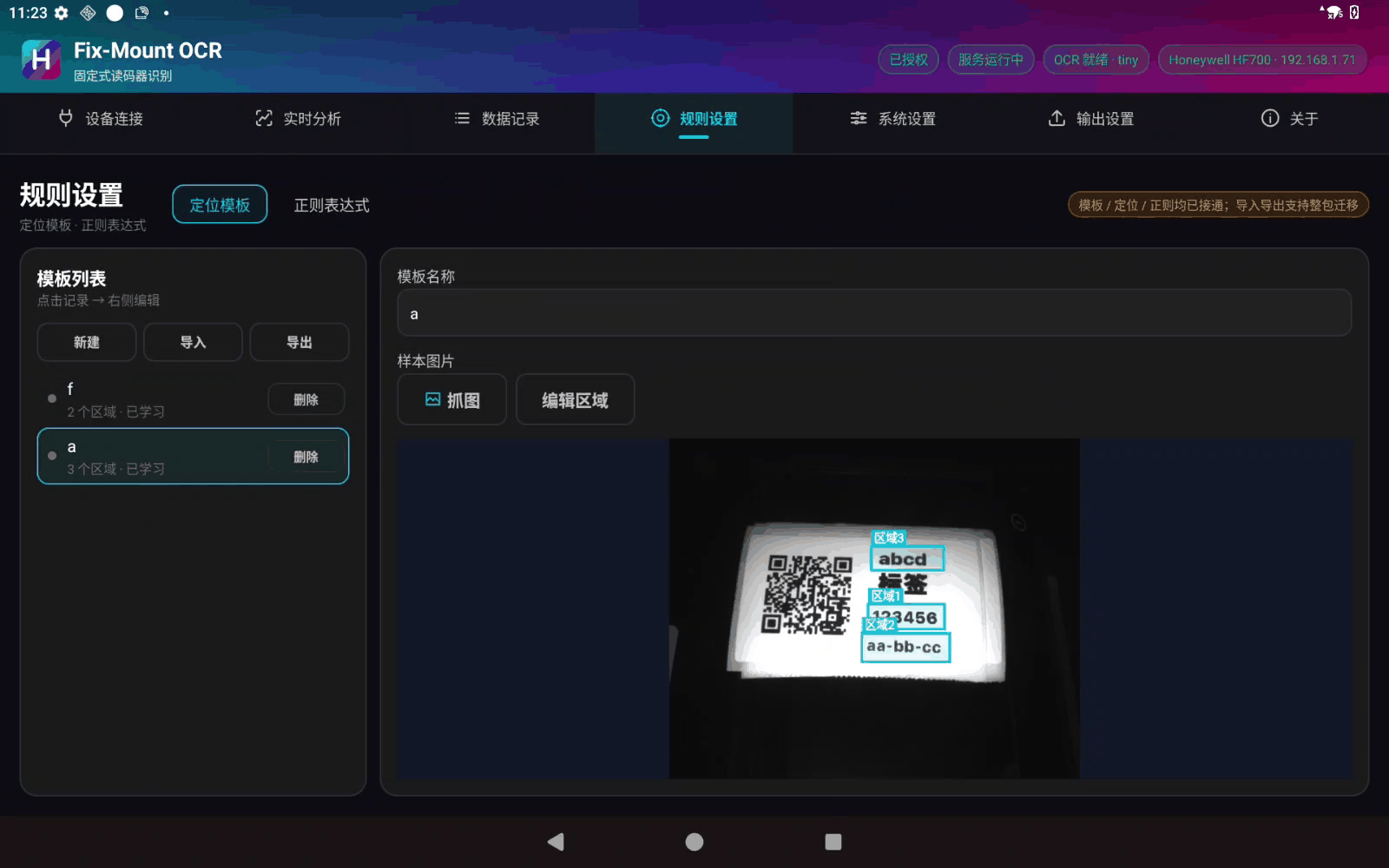
Parts never stop in exactly the same place, so fixed-coordinate cropping always drifts.
.feat fileMeasured: 48 ms to learn, 143 ms to match, three regions included.
There are exactly two fallback behaviours, and no third:
| Setting | When alignment fails |
|---|---|
| Fall back to full frame | OCR the entire image — the line keeps running |
| Do not fall back | Return NA — never dress noise up as a false OK |
With several templates, a single “do not fall back” setting makes the whole line behave that way — the strictest rule wins.
| Build | Character | Use |
|---|---|---|
| tiny | Smaller model, faster | Normal production (default) |
| small | Higher accuracy, longer | Hard characters, high-precision work |
The model is a resident singleton, warmed at startup, and swapped by releasing before loading — never two models resident at once.
priority only sets the output orderChanging to a new label layout means redrawing the regions and swapping the rule set. No code changes.
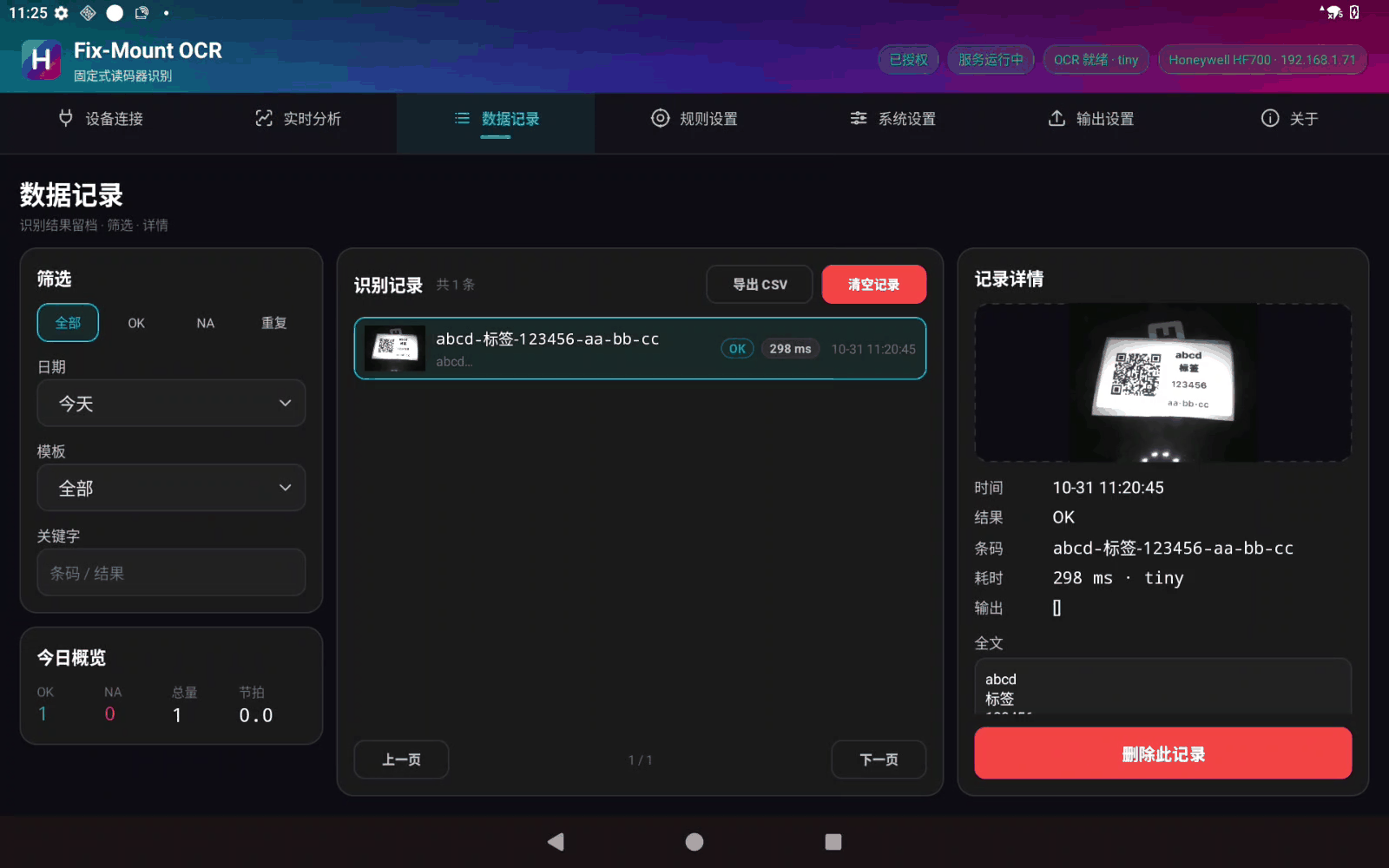
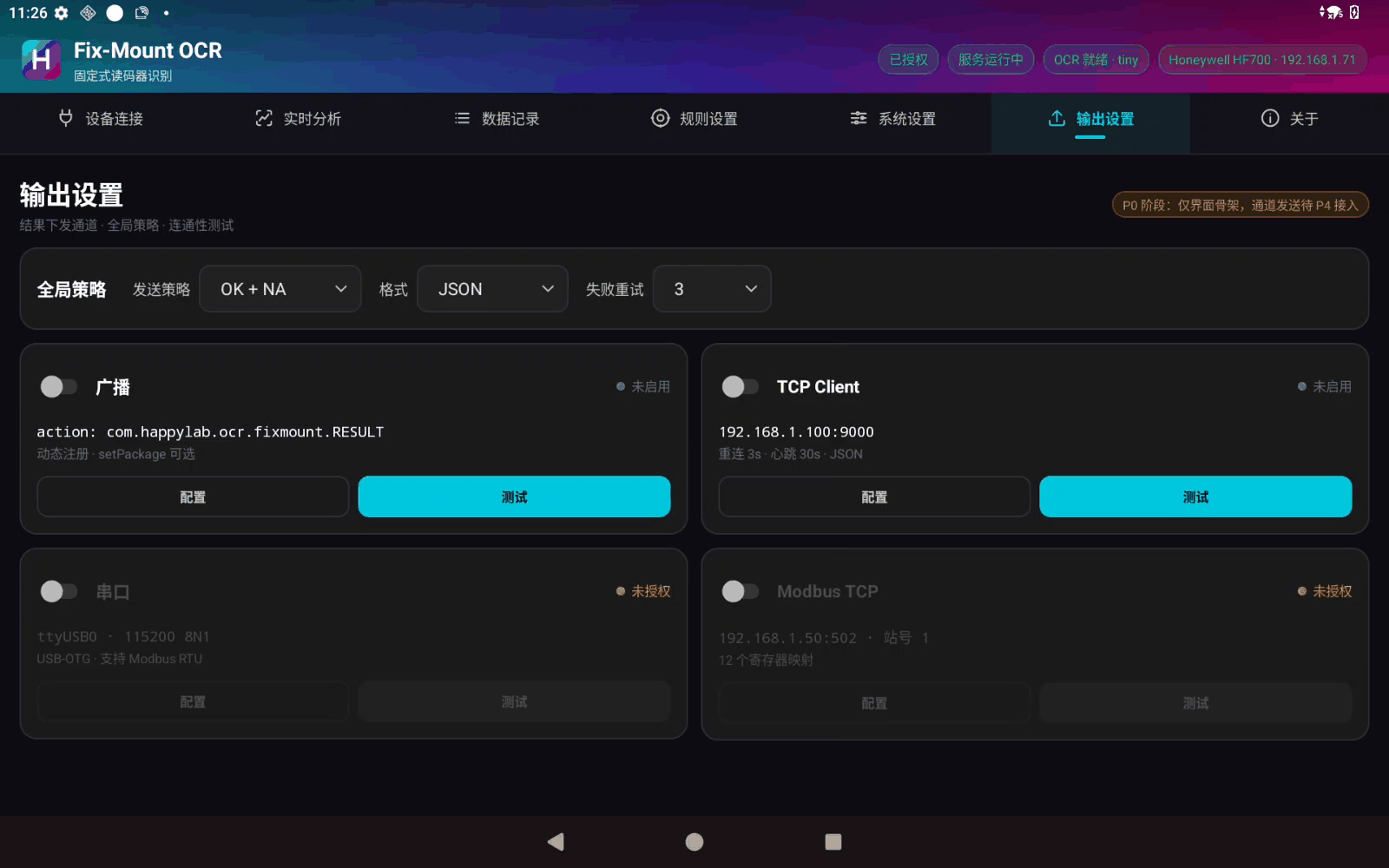
One row per result in SQLite, carrying:
The log page filters by date, template and keyword, with paging, detail view, delete, clear and CSV export.
Why the CSV carries a BOM
Without a UTF-8 BOM, spreadsheet applications open non-ASCII columns as mojibake. It is a small problem that every site eventually hits, so it is fixed in the export layer instead of in a support ticket.
Two systems can look identical in a demo and separate immediately in a workshop. Everything below came from running this build on a line.
A fixed-mount reader is usually mounted on the side or above the line, so the viewing angle is constrained. A PC needs space beside it for a chassis and a monitor, plus a mains run, a video cable and room for an operator.
The tablet compresses all of that into one mount, one network cable, one power feed:
The part that gets missed
When retrofitting an old line, the hard constraint is rarely software. It is “no space in the cabinet, no spare breaker, and one network port left.” A tablet sidesteps all three at once.
The real rhythm of a line is: start the shift, power down at lunch, trip a breaker, change over, stop for a while. An industrial PC handles all of this badly — an update stuck at boot, a service that never started, a session nobody logged into, a remote desktop that will not connect.
The tablet’s answer is plain but effective:
One less operating system is half the failure surface gone. On a line, that sentence is worth a lot.
The fan in an industrial PC is a vacuum cleaner for the workshop. After a year the heatsink is felted with dust, and by summer the CPU is thermally throttled. The tablet is passively cooled, with no moving parts and no mechanical disk:
Changing product on a PC-based station usually means: edit config → remote in → restart the service → debug on site → drive back when it fails again.
Here, configuration (a template ZIP and a regex JSON) takes effect on import:
| Action | Time |
|---|---|
| Deploy a new station | Install APK, enter IP, import template — about 10 minutes |
| Change label layout | Import the new template package, switch in seconds |
| Device failure | Swap in the same tablet model, import config, keep running |
| Add the Nth station | Copy the same configuration — no redevelopment |
Not every position on a line justifies a permanently installed system:
With a PC, monitor and cabinet these cases never pay off. With a tablet, you pick it up and go.
For medical UDI, automotive components and any supplier working on an air-gapped network, this item is often the condition for getting through the door at all.
| Task | PC-based station | Tablet edition |
|---|---|---|
| OS updates | Monthly patches, afraid of breaking a driver | In-app upgrade, controlled |
| Viruses / USB sticks | Antivirus, USB restrictions | No general filesystem exposed |
| Fault finding | Remote desktop plus someone on site | In-app logs, one-tap export |
| Spares | Motherboard, RAM, disk, PSU | One replacement tablet |
The tablet we validate on is built on a Qualcomm QCM6690, and the paper specification is not weak:
| NPU | Hexagon NPU, 6 TOPS claimed |
| GPU | Adreno 643L |
| System | Android 16 |
On the real device, this generation of industrial firmware does not expose the NPU to applications — the neural-network HAL is missing and there is no vendor inference library. That is not unusual. Industrial terminal firmware consistently lags phone firmware by a release or two.
So the route is: do not bet on the hardware; make the CPU fast enough first.
Here is where a frame actually goes (real device, three regions):
| Stage | Time | Note |
|---|---|---|
| BMP decode + rotate | 35 ms | Pure CPU, cannot be offloaded |
| ORB alignment | 143 ms | About 60% of the frame — the real cost |
| OCR, full segment (inference 35–45 ms) | 81 ms | Inference is only half of that |
| JPEG encode for the record | 16 ms | Can be switched off |
| End to end | ~240 ms | Stages overlap; measured from device logs |
The lesson: ignore TOPS
Even if the NPU made inference free, the frame would go from 240 ms to 200 ms — a 17% gain. The bottleneck is the ORB geometry, not the neural network.
Which makes a useful point: at the 6 MB model scale, compute is never the first bottleneck. Small model, short pipeline, clean engineering — the CPU is enough. That is exactly why the whole system fits in a tablet.
The on-device software stack changed generation in 2026, which suits a product built once and shipped across hardware generations.
1. LiteRT becomes the single entry point. NNAPI is deprecated; the replacement is LiteRT (formerly TFLite), one API across Qualcomm, MediaTek, Samsung and Google Tensor NPUs, with ahead-of-time compilation and per-device AI packs. It requires API 31+, which the tablet already exceeds.
2. On Qualcomm, ONNX plus QNN. Our models are standard ONNX exported straight from PyTorch, so on Snapdragon they can go through the QNN execution provider to Hexagon directly. No retraining, no framework migration. The same model file runs on the CPU today and the NPU tomorrow.
3. The right split for OCR: detection on CPU, recognition on NPU.
| Sub-model | Input shape | NPU friendliness |
|---|---|---|
| Text detection | Dynamic | ❌ Poor — NPUs want static shapes |
| Text recognition | Fixed 3×48×320 | ✅ Excellent |
So the realistic speed-up is not “put the whole model on the NPU”. It is hybrid inference: detection stays on the CPU, the recognition batch goes to the NPU. For this workload that cut lands exactly where the payoff is.
4. Order matters: quantize first, accelerate second.
1 | FP32 baseline → INT8 quantization → NPU acceleration → vendor tuning |
INT8 alone is a 2–4× speed-up that every device benefits from; the NPU is the bonus. Each step is measured on its own — never three changes at once.
One trap worth remembering
If a single operator is unsupported on the NPU, the runtime silently falls back to the CPU — no error, no warning. You just conclude that the marketing was fiction. Real verification means inspecting the backend assigned to every layer, not flipping an “NPU on” switch.
The roadmap for industrial silicon is already visible. Take a current-generation part such as Qualcomm’s Dragonwing Q-6690:
Three consequences, and they are structural for line-side systems.
a) One board, capability that grows in software. Ship it today as a barcode terminal; unlock an NPU tier next year and the same unit runs OCR, defect detection and voice commands. Design the hardware once, differentiate in software. Standard ONNX plus a standard runtime is how we stay eligible for that.
b) Portable compute: from fixed station to mobile station.
| Form | Scenario |
|---|---|
| Battery-powered inspection terminal | Warehouse, dock, outdoor yard — carried |
| Mobile quality backpack | One tablet, one reader, several stations in rotation |
| Handheld plus tablet | Handheld scans, tablet concludes, report on the spot |
| Temporary line or trade show | No wiring, no panel — power on and demonstrate the full chain |
c) The metric shifts from peak TOPS to sustained milliwatts. A line does not need a benchmark score. It needs eight continuous hours without throttling, without a hot back panel, without dropped frames. Low-power NPUs and compute-in-memory matter precisely because industrial systems are never switched off.
For the next two years, “portable, offline, and enough compute” will be worth more than “the most compute”. What is genuinely scarce on a line is not TOPS — it is a box that mounts beside the station, needs no operator, and comes back up after a power cut.
| Metric | Value |
|---|---|
| Gradle modules | 21 (12 core-* capability modules, 7 feature-* screens) |
| Java files | 199 |
| Lines of code | 26.5k |
| JVM unit tests | 86, none requiring a device |
| Localization | 9 modules × 3 languages, no hard-coded Chinese in the core layer |
| Settings | 68 keys, all behind one settings store |
| Screens | 7 top-level tabs |
A few rules that keep it from becoming a demo:
core-* never depends on UI and never returns Chinese — it returns stable codes, and the UI maps them into three languagesAnalysisResult, used by the database, the UI and every output channel--rerun-tasks — incremental builds produce false successesOne Android 16 pitfall that is easy to miss
On large screens at 600 dp and above, Android 16 ignores screenOrientation from the manifest. Locking landscape therefore needs both a system-level orientation lock and a responsive layout — one line of manifest is not enough.
It does:
It refuses to:
| Not supported | Why |
|---|---|
| Focus injection (typing results into another business app’s fields) | The business app is not ours to control; injecting into it is hijacking. Results leave through external channels, and the customer system subscribes |
| Cloud recognition | Line data leaving the plant is a hard line |
| “Universal OCR” | A fixed-mount station needs a handful of fields read reliably, not everything read approximately |
Honest status
| Metric | Value |
|---|---|
| Capture success (51 consecutive triggers) | 51 / 51 |
| Capture time per trigger | 143 ms best / 164 ms median |
| Interval between triggers | 0.19 s best / 0.30 s median |
| Frame processing (3 regions) | ~240 ms |
| ORB learning | 48 ms |
| ORB matching | 143 ms |
| OCR, all regions | 81 ms |
| BMP decode | 3–5 ms |
| Burst of 8 consecutive images | All correct, no dropped frames, no crash |
| Memory | PSS 161 MB, Java heap 23 MB of 256 MB, no growth |
| APK | ~85 MB (both model builds included) |
| Offline | ✅ Fully local, no data leaves the device |
| Scenario | Why |
|---|---|
| 🏭 Small or temporary stations | No industrial PC for a handful of devices — mount it and run |
| 🔧 Retrofitting an existing line | You already have readers pushing FTP images; add character reading without touching the cabinet, the power or the network |
| 📦 Roving inspection | One tablet follows the work, configuration imports in seconds |
| 🏗️ Pilot production | Validate cheaply, then decide whether to standardise the station |
| 🎓 Demos and training | One screen shows the whole chain: source image, boxes, fields, records |
| 🚫 No on-site IT | Nobody to maintain Windows? That is the point |
:::warning What this build is
This is a complete line-side application with a defined scope, not a universal recognition platform. It reads the fields you configured, on the layouts you taught it, and it reports NA rather than guessing.
We do not build universal recognition. We build the version that keeps running on a line.
Three steps to a working station: install the APK → enter the reader’s IP and the FTP target → draw the regions and set the rules. From unboxing to the first record takes hours, not weeks.
The Android tablet edition is available as a build option — pricing and the custom-option list are on the Fixed-Mount OCR pricing page, and a free 30-day trial runs on your own reader and your own parts.
Related reading: Fixed-Mount OCR V2 covers the PC-based line edition and barcode grading, On-Device AI on Android explains what an NPU can and cannot run today, and Barcode Quality Grading covers the grading engine this build reuses.
Tell us what your station looks like — the reader, the part, the fields and the cycle time — and we will set up a fast, tailored build, including a trial on your own samples.
📧 sales@happylab.me · 🌐 global.happylab.me
HappyLab builds practical AI and browser-based tools for industrial device workflows.
Next
A spec sheet says 40 TOPS. Your OCR model still takes 400 ms and warms the back ...
HappyLab shared on Oct 27, 2026